I study English with YouTube — talks, news clips, podcasts, whatever I’m watching that week — and I kept hitting the same three subtitle chores: pull the transcript off a video that has captions, generate one when it doesn’t, and translate a subtitle track — an .srt I already have, or one embedded in a downloaded file. Each is a small pipeline of yt-dlp/ffmpeg/Whisper glue that I was retyping from memory every time.
So I turned each into a Claude Code skill. Now I describe the task (“grab the captions from this video”) and the skill runs the right pipeline. The three are on GitHub: github.com/jamongx/claude-skills. This post is the “why” behind each one — mostly the failure points that took a few tries to get right.
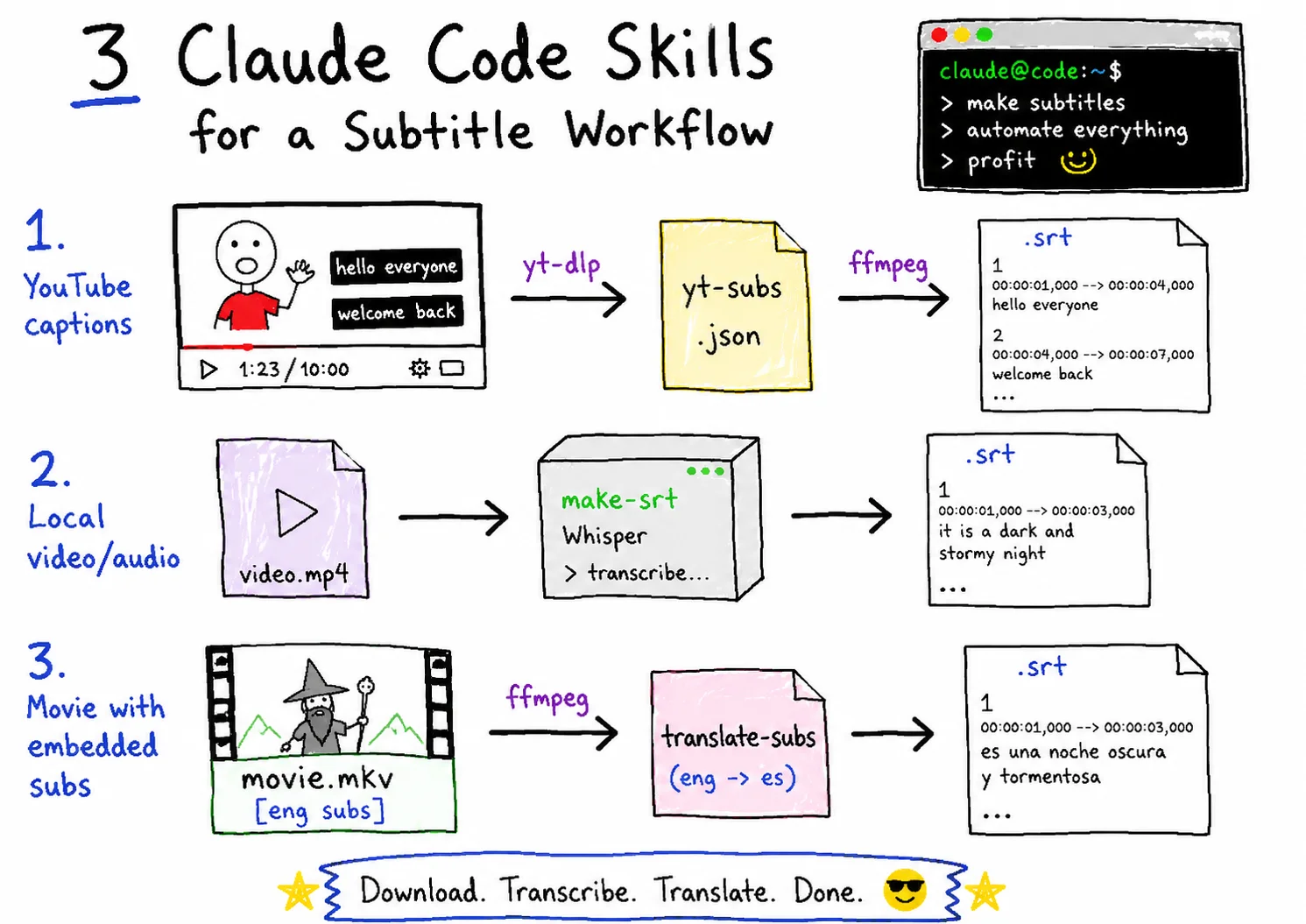
How the three fit together
YouTube video ──/yt-subs──▶ .srt ─┐
                                    ├──/translate-subs──▶ translated .srt
local video/audio ──/make-srt──▶ .srt ┘
(no captions)yt-subs— the video already has captions on YouTube → download them as a clean.srt.make-srt— the file has no subtitles at all → generate them from the audio with speech-to-text.translate-subs— translate an.srtyou already have, or extract an embedded subtitle track from a video and translate that.
The output is always a plain .srt, so the download/generate step feeds straight into the translate step.
yt-subs: download captions as clean SRT
The naive version is one yt-dlp line. The reason it became a skill is that YouTube auto-captions are a mess to convert. They come as VTT with per-word timing tags and a rolling window that repeats each line across consecutive cues, so a straight VTT-to-SRT conversion gives you duplicated, partially overlapping lines.
The skill prefers human-authored subtitles and falls back to auto-captions, then strips the inline <...> tags and de-duplicates the rolling overlap. The deduplication itself is fairly simple:
def dedup(cues):
    out, prev = [], []
    for start, end, lines in cues:
        new = [l for l in lines if l not in prev]  # drop carried-over lines
        prev = lines
        if new:
            out.append((start, end, " ".join(new)))
    return out
Usage:
# see what's available first
python3 yt_subs.py "<url>" --list
# download English as SRT (human subs preferred, auto fallback)
python3 yt_subs.py "<url>" --lang en
On a TED talk with human subtitles, here’s the actual run and a format check — the index count and the timestamp count match, and there are no repeated lines:
$ python3 yt_subs.py "<url>" --lang en
Wrote 315 cues (human subtitles, lang=en) -> Inside the Mind of a Master Procrastinator....srt

$ grep -cE '^[0-9]+$' *.srt   # index lines
315
$ grep -cE ' --> ' *.srt      # timestamp lines
315
Auto-captions are still only approximate — proper names may be misspelled and sentence breaks can be rough — so the skill tells you when it has fallen back to them.
One rule I put in the README and will repeat here: download subtitles only for personal, lawful use (study, accessibility, translation).
make-srt: transcribe when there are no captions
When a file has no subtitle track, there’s nothing to download — you have to generate one. make-srt extracts 16 kHz mono audio with ffmpeg and POSTs it to a local Whisper server that returns timestamped segments:
ffmpeg -i input.mp4 -vn -ac 1 -ar 16000 -b:a 32k audio.mp3
# → POST to the Whisper server /transcribe → segments → .srt
The Whisper server is its own small project (Docker + GPU + FastAPI): github.com/jamongx/whisper-server. Two things bit me here:
- The
smallmodel misspells proper nouns. In videos about Claude Code, it often transcribes “Claude” as clod, clawed, or cloud. Two fixes: pass a vocabulary hint via--initial-prompt "Claude Code, Anthropic, MCP", and/or run a post-pass word replacement. Timecodes are numeric, so text substitution can’t corrupt them. - Don’t reach for
mediumon a 6 GB GPU. On my GTX 1660 Ti (6 GB),medium+fp16 fits in VRAM, but during batch jobs it pins the GPU at ~96% long enough to hang the whole machine — a hard reboot, not a crash you recover from. On this 6 GB setup,smallis the safer call for batch subtitling.
If you want the deeper Whisper pipeline (speaker labels with pyannote), I wrote that up separately: Generate Speaker-Labeled Subtitles with Whisper and pyannote.audio.
translate-subs: translate an SRT, or extract one first
For a downloaded video (mkv, etc.) with an embedded subtitle track, the job is extract → convert → translate. The gotcha is in the extract step: converting ASS straight to SRT drags along the typography and karaoke effects, and the file explodes past 10 MB.
So the skill first extracts the subtitle track as ASS, then converts it to SRT keeping only the main dialogue style (Signs/OP/ED/furigana styles are noise):
# 1. inspect subtitle streams, find the track index
ffprobe -v error -show_entries stream=index,codec_name,codec_type:stream_tags=language,title input.mkv
# 2. extract the track AS ASS (not SRT) to avoid the bloat
ffmpeg -i input.mkv -map 0:<index> -c:s copy sub.en.ass
# 3. ASS → SRT, keeping only the "Default" dialogue style
python3 ass_to_srt.py sub.en.ass sub.en.srt "Default"
The extraction steps are only for videos with an embedded track. If you already have an .srt — say, from yt-subs or make-srt — the skill skips straight to translating it. Claude reads and translates the SRT directly — no external translation API or API key required. When translating a series, the skill keeps a per-title glossary so character names, proper nouns, and speech register stay consistent across episodes.
Takeaways
The skills are less about clever code and more about encoding the gotchas so I stop re-learning them: the rolling-window dedup for auto-captions, the small-model vocabulary hint, the 6 GB GPU ceiling, the extract-as-ASS rule. That’s the part worth sharing.
Grab them at github.com/jamongx/claude-skills. If a video has captions, start with yt-subs; if it doesn’t, make-srt; either way, translate-subs takes the .srt from there.