[SecureCRT] How to Set Up a Serial Console Connection
-
 Jason Yang
 - 02 Dec, 2025
- Updated 04 Jan, 2026
- Views —
![[SecureCRT] How to Set Up a Serial Console Connection](/images/covers/securecrt_logo.webp)
Below are the standard configuration values for establishing a serial console connection to HP servers (e.g., DL380, DL580 running Red Hat Linux) or HP-UX servers using SecureCRT.
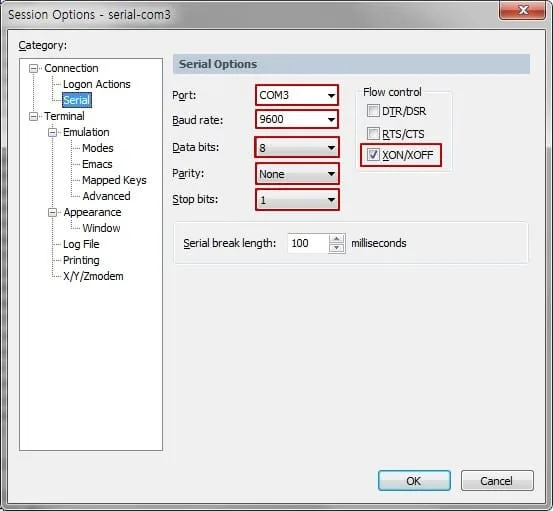
1. Configuration Screenshot
2. Configuration Details
Here are the recommended settings and descriptions for each item.
| Setting | Value | Description |
|---|---|---|
| Port | COMx | Your Actual Port Number |
COM3 in the image is just an example. You must check the actual COM port assigned to your serial cable in Windows ‘Device Manager’ and enter that number. | ||
| Baud rate | 9600 | Communication Speed (bps) |
9600 is the default for most legacy servers (e.g., Gen8, Gen9). (Note: Newer equipment might use 115200). | ||
| Data bits | 8 | Data Bits |
| Standard setting for ASCII data transmission. | ||
| Parity | None | Parity Bit |
| Used for error checking. “None” is the industry standard for console connections. | ||
| Stop bits | 1 | Stop Bits |
| The number of bits used to signal the end of a data packet. | ||
| Flow control | XON/XOFF | Flow Control |
| Software-based flow control. (RTS/CTS is hardware-based). |
Why a serial console at all?
A serial console is out-of-band access — it talks to the server’s console port directly, independent of the network and even of the OS. That’s exactly when you reach for it: the box won’t boot, the network config is broken, or you’re watching BIOS/firmware messages that SSH never sees. On the HP DL380/DL580 and HP-UX servers above, it’s the lifeline when nothing else answers.
Finding your COM port
Most laptops haven’t had a physical serial port in years, so in practice you’re using a USB-to-serial adapter. Windows assigns it a COMx number when you plug it in — open Device Manager → Ports (COM & LPT) and read off the number, then enter that as the Port. If SecureCRT reports the port is unavailable, it’s usually the wrong COM number, or another program (a stray PuTTY session) is already holding it open.
When the screen fills with garbage
The classic symptom of a wrong setting is a screen of random symbols instead of readable text — usually a baud-rate mismatch (though data bits, parity, or a bad cable can do it too). Baud is the first thing to verify. The two common values are 9600 and 115200, but the right one depends on the specific server, firmware, or console — check its manual, since age or generation alone doesn’t decide it (plenty of older iLO gear defaults to 115200). Data bits, parity, and stop bits (8 / None / 1) are near-universal for consoles, so start with baud when the output is unreadable.
XON/XOFF vs RTS/CTS
Flow control decides how the two ends tell each other to pause. XON/XOFF is software flow control and a common console setting; RTS/CTS is hardware flow control and needs a cable wired for those extra lines. Match whatever the device’s manual specifies — many consoles simply use None — and only pick RTS/CTS if your adapter and cable support it.
To install SecureCRT on Ubuntu in the first place, see installing SecureCRT on Ubuntu 24.04.