“Prompt engineering” has been a buzzword for a few years now. But if you look at what actually happens in practice, the prompt is only the innermost piece of the picture. I find it useful to think of AI engineering as four layers: prompt, context, harness, and loop. You start with the prompt at the center, and as you move outward, you deal with the information the model sees, then the code around the model, then the structure that keeps it running.
To be clear, this isn’t an official industry taxonomy. The boundaries between layers overlap in places. But as a practical frame for deciding what to improve next in an AI system, it works well.
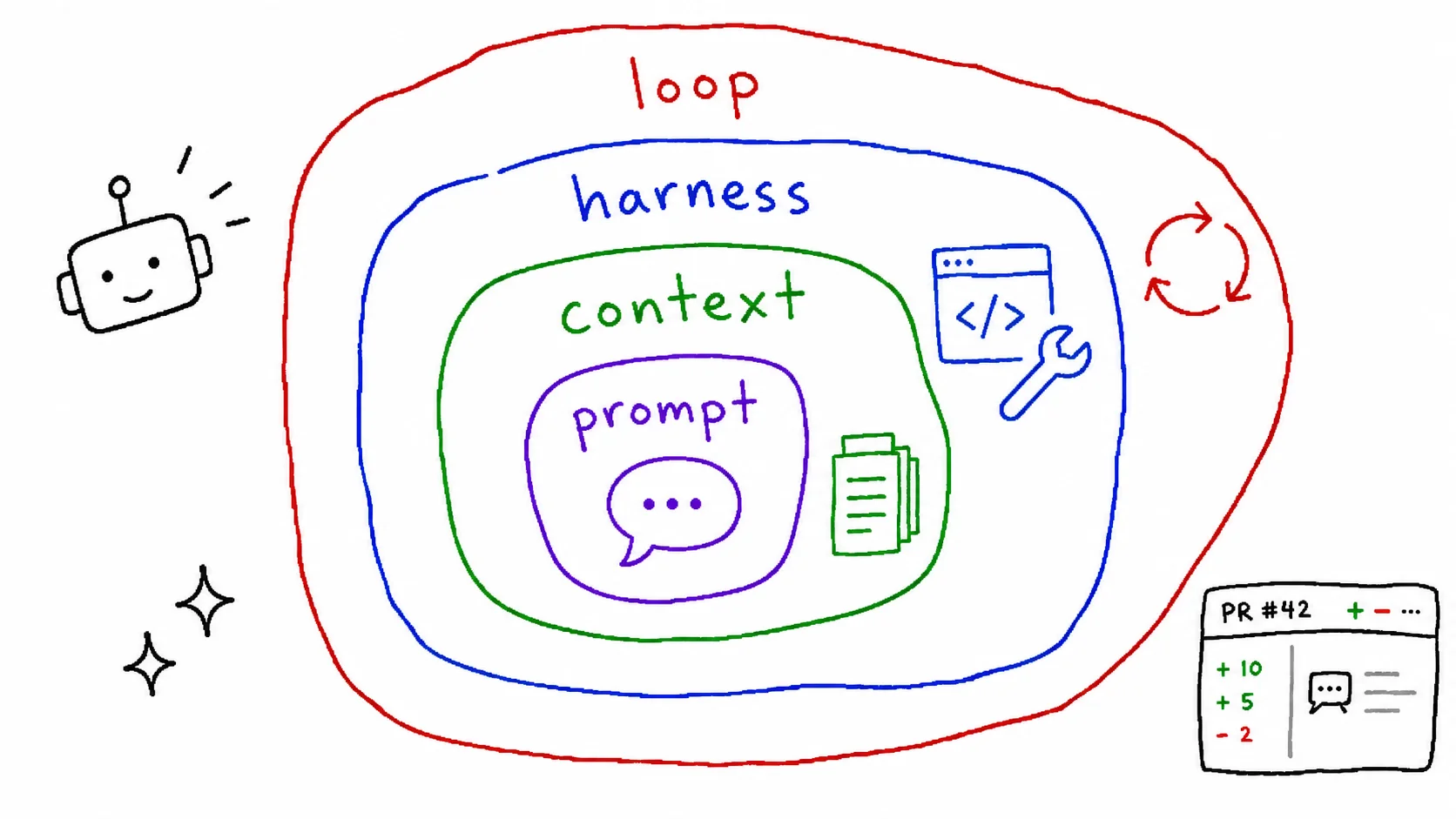
Definitions alone would be too abstract, so let’s use the same scenario across all four layers: a system where an AI reviews the code every time a PR is opened. Watching the same goal change shape at each layer makes the role of each one clear.
1. Prompt Engineering
The innermost layer. This is what you type directly into the chat box:
- what to ask
- how to ask it
- what to tell the model to avoid
Example. In the code review scenario, this is the stage where you paste a diff into a chat window and ask for a review.
A bad prompt:
Review this code.A better prompt:
Review this diff.
- Check for potential bugs, then security issues, then performance, in that order.
- Skip style nitpicks. The linter handles those.
- If there's nothing wrong, just say "no issues". Don't invent problems to have something to say.
- For each finding, include the line number and a suggested fix.
Same model, same diff, but the focus and consistency of the output change quite a bit, because you’ve spelled out what to look at, what to ignore, and what shape the answer should take. The “don’t invent problems” line matters more than it looks. Without it, the model sometimes flags trivial style issues or manufactures findings just to produce something.
This is also the layer where most people stay when they first use AI. The problem is that no matter how much you polish the prompt, if the model doesn’t know your project, the output stays generic. Even with the prompt above, the model has no idea what error handling convention your team uses or where this function gets called from.
2. Context Engineering
Everything you provide beyond the direct request, so the model has something to base its judgment on. This is the second layer, wrapped around the prompt:
- system instructions
- reference documents
- conversation history
- good examples (few-shot)
- expected output samples and writing rules
Example. In the code review scenario, context engineering means laying out the background the model needs instead of just throwing a diff at it.
[System instructions]
You are a senior reviewer on our team. Review against the conventions below.

[Reference: team conventions]
- Errors are returned as Result types, not thrown as exceptions.
- All DB access goes through the repository layer.
- External API calls must specify a timeout.

[Reference: related code]
- The relevant parts of the 3 files that call this function

[Good examples: 2 past review comments]
- The tone and depth of reviews our team actually writes

[Prompt]
Review this diff. (same as before)
Now the model judges the code against “our team’s standards” rather than “generally good code.” If someone throws an exception in a place where the team convention calls for a Result type, the model can flag that violation. That’s a finding you’d rarely get without context.
CLAUDE.md in Claude Code is the classic example of this layer. Put your project structure, coding conventions, and build commands in there once, and you don’t have to explain them in every prompt. You can also split rules by file type or directory with .claude/rules/, and provide documents like a DESIGN.md that captures design intent as context when it’s needed. These files are persistent context: write them once, and they keep getting used. An implementation plan you write for a specific task, on the other hand, is closer to one-off context. If you keep the plan and its progress updated as you go, it helps the model keep track of the overall direction and where it currently is. Retrieving relevant documents with RAG and feeding them to the model is another typical form of context engineering. MCP is related to context in that it brings outside information to the model, but the part where you connect tools and manage calls belongs to the next layer, the harness. It’s one of the clearest places where the boundaries blur.
So if a task depends on project-specific rules or related code, polishing the prompt only gets you so far. The model has never seen your codebase, and if you don’t give it the information it needs, it has no choice but to fill the gaps with inference.
3. Harness Engineering
The harness is the code around the model call. Note that it wraps the call itself, not the model’s output: assemble the prompt and context, call the model, validate what comes back, retry on failure. It’s the software structure around that one cycle.
- tool connections (tool calling, MCP servers)
- output validation
- retry logic
- structured output (JSON schema)
If the first two layers are about designing the input you hand to the model (not just what to instruct, but which documents to pull in and what to leave out), the harness is the code that processes that input reliably in a real system. It’s traditional software engineering: validation, retries, exception handling. A familiar analogy is an external API client. It’s a lot like putting timeouts, retries, and response validation around a remote service. The difference is that model calls add a new failure class on top of network errors and 5xx responses: semantic failures, where the output is malformed or plausibly wrong.
Model output is probabilistic, so you get format errors and missing pieces. You ask for JSON and it comes back wrapped in a markdown code block, or with a field missing. The harness validates and retries on these failures, and it also manages tool calls and feeds their results back in.
Example. To run the code review in GitHub Actions instead of a chat window, you need code around the model call. What follows is pseudocode for illustration.
# Pseudocode for illustration. In practice, use a Pydantic model or JSON Schema.
REVIEW_SCHEMA = {
    "comments": [{"file": str, "line": int, "severity": str, "message": str}]
}

def review_pr(diff: str, context: str, feedback: list | None = None) -> list[Comment]:
    retry_feedback = None
    for attempt in range(3):
        raw = call_model(
            context=context,
            diff=diff,                      # never mutate the original diff
            feedback=feedback,              # failure records passed in by the outer loop
            retry_feedback=retry_feedback,  # retry reasons travel on a separate channel
            output_schema=REVIEW_SCHEMA,
        )
        try:
            result = validate(raw, REVIEW_SCHEMA)
        except ValidationError as e:
            retry_feedback = f"Schema error in previous response: {e}"
            continue
        # cross-check that each file and line number belongs to an actual changed hunk
        invalid = find_invalid_comments(result.comments, diff)
        if invalid:
            retry_feedback = "Some comments don't match actual diff lines."
            continue
        return result.comments
    raise ReviewFailed("Failed after 3 retries")
The harness does three things here. It requests structured output and validates it against a schema, it retries with the failure reason fed back in, and it cross-checks locations the model may have made up (files or lines that aren’t in any changed hunk). That last one matters most. Prompts alone can’t fully prevent bad output, so anything you can verify in code, verify in code. Retrying or failing on invalid comments, rather than silently filtering them out, is also a deliberate choice. If you just drop the made-up comments, a response where every comment is invalid becomes an empty list, which reads as “no issues found.”
This validation and recovery logic is what turns a model call into a reliable software component. Things that work fine in a demo fail intermittently in production, on parsing or validation, and catching those failures is the harness’s job. A production harness also includes logging, cost tracking, and collecting failure cases. If you don’t record failures, you don’t know what to improve.
By this post’s classification, Claude Code itself can be seen as a harness around the model. It provides the execution structure: not just model calls, but tool execution, file editing, and permission checks. If you use Claude Code, you’re already using a harness every day.
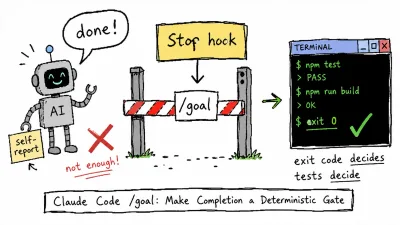
The difference between context and harness shows up clearly if you compare CLAUDE.md with hooks. Write “run the linter before committing” in CLAUDE.md and it’s context. It nudges the model to comply, but nothing guarantees it happens. Configure a PreToolUse command hook that fires before git commit runs, and now the commit can be blocked in code when the lint fails. Same goal, different enforcement depending on which layer it lives in. Things you can leave to the model’s judgment go in context; things that must be guaranteed go in the harness.
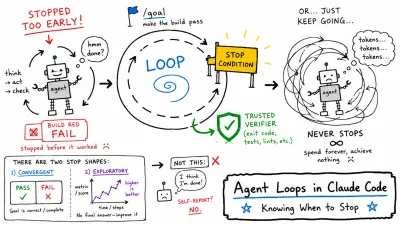
But if retries are the harness’s job, what’s different about the next layer, the loop? The unit of retry. The for attempt in range(3) in the code above retries the same model call until it gets output in the right shape. The goal is one valid response. A loop, on the other hand, repeats the entire review-fix-test cycle until it reaches a target state. The harness builds reliable parts; the loop assembles those parts and drives them toward a goal.
4. Loop Engineering
The outermost layer. This is where the system starts running on its own:
- a goal and stop conditions
- iterating with self-checks and adjustments
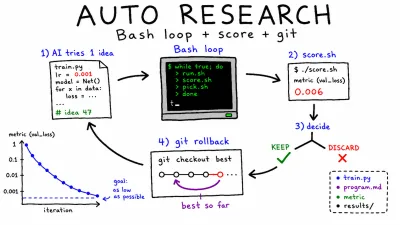
Even a system with a solid harness stops after one run, which means a human has to keep issuing the next instruction. A loop sets a goal and stop conditions, like “until all tests pass” or “until lint errors hit zero,” and lets the system drive itself.
Example. Let’s push the review system one step further: instead of just pointing out problems, it fixes them too, repeating review, fix, and re-verify on its own. Pseudocode again.
MAX_ITERATIONS = 5

def auto_fix_pr(pr):
    feedback = []                                   # loop state that persists across iterations

    # check the baseline first: tests that were already broken go to a human
    baseline = run_tests(pr)
    if not baseline.passed:
        return pr.request_human_review("Tests were failing before auto-fix started")

    for i in range(MAX_ITERATIONS):
        comments = review_pr(pr.diff, pr.context, feedback=feedback)  # reusing layer 3

        if not comments:
            result = run_tests(pr)
            if result.passed:
                # mark the AI review as passed; final approval stays with a human
                return pr.request_human_approval("Passed AI review and tests")
            # no comments but tests fail: skip fixing, go to the next iteration
            feedback.append({"type": "test_failure", "log": result.failure_log})
            continue

        pr, fix_commit = apply_fixes(pr, comments)  # keep the fix commit ID

        result = run_tests(pr)                      # self-check
        if result.passed:
            feedback = []                           # clear resolved failure records
        else:
            pr = revert_commit(pr, fix_commit)      # revert exactly the commit the AI made
            feedback.append({                       # carry the failure log to the next iteration
                "type": "test_failure",
                "log": result.failure_log,
            })

    return pr.request_human_review("Unresolved after 5 iterations")  # stop condition
Everything is in there: a goal (no comments plus passing tests), self-checks (running tests), adjustment (revert on failure and carry the log forward in feedback), and stop conditions (5 iterations max, then escalate to a human). The fact that auto_fix_pr calls review_pr from layer 3 directly is the relationship from the previous section: the loop assembles the parts the harness built.
Failure logs go into feedback outside the loop body, not into a local variable of the current iteration. That’s what lets the next model call actually see the earlier failures. And once a fix passes the tests, the accumulated failure records get cleared. There’s no reason for the next review to keep referring to errors that were already resolved.
Fix commits are only created when there are comments, and the revert targets the exact commit ID that apply_fixes returned. Reverting “the last commit” can delete the wrong commit if a human pushes while the loop is running.
Checking the baseline tests before entering the loop follows the same logic. To treat a test failure as the result of an AI fix, you first have to know the PR’s tests were passing before the auto-fix started. If they were already failing, reverting the last fix commit won’t solve anything.
It also matters that meeting the conditions doesn’t auto-approve the PR. The AI finding no comments is not a guarantee the code is fine, so final merge approval stays with a human. Permission control spans both the harness and the loop, but it becomes especially important at the loop stage, once the system starts acting repeatedly. In real operations, it’s safer to auto-fix only low-risk categories like formatting rather than applying every comment automatically.
Claude Code fixing code, running tests, reading the failures, and fixing again is a good example of a loop.
The heart of it is the stop conditions. Without a max iteration count, a cost ceiling, and a success criterion, a loop either runs away or spins in place. Take MAX_ITERATIONS and the human escalation out of the example above, and you have a system that burns tokens forever on a PR whose tests can never be fixed.
Without a loop, a human has to check the result and issue the next instruction on every iteration. Iteration with self-checks is a core ingredient of agent systems. But an actual agent combines this with tool use, state management, and permission control, so a loop by itself is not the whole of an agent.
Summary
| Layer | What it does | In the code review scenario | Without it |
|---|---|---|---|
| 1. Prompt | The request you type | ”What to look at, what to ignore” | Nothing starts |
| 2. Context | Background the model sees | Team conventions, related code, past reviews | It guesses |
| 3. Harness | Validation, retries, tool wiring | Schema validation, line-number cross-checks | It wobbles |
| 4. Loop | Goals, stop conditions, iteration | Review-fix-test cycle, human keeps final approval | It stalls |
A great prompt without context guesses. Great context without a harness wobbles. A harness without a loop stalls. And for repetitive work without a loop, you become the bottleneck.
If all you’ve been doing is polishing prompts, you’ve been working on just the innermost layer. When the results still disappoint, the next improvement may be further out.