Use jq to Format JSON in Vim on Ubuntu (Prettify & Minify)
-
 Jason Yang
 - 01 Jan, 2026
- Updated 26 Mar, 2026
- Views —

Paste a blob of minified JSON into Vim and it’s one unreadable line. Instead of reaching for an online formatter, pipe the buffer through jq — one command reflows the whole file, and it works the same over SSH where a GUI tool isn’t an option.
Step 1: Install jq on Ubuntu
Install jq using the default package manager:
sudo apt update
sudo apt install jq
Verify the installation:
jq --versionYou should see:
jq-1.6Step 2: Test jq in the Terminal
You can quickly test jq by formatting a JSON file:
jq . data.jsonThis will pretty-print the JSON output in the terminal.
Step 3: Use jq Inside Vim
Open a JSON file in Vim and run:
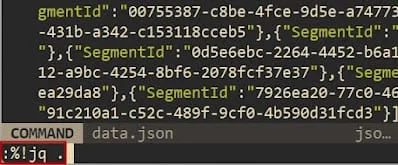
:%!jq .This command sends the entire file through jq and replaces it with formatted JSON.
What :%! actually does
:%!cmd isn’t a jq feature — it’s a Vim one, and it’s worth understanding because it works with any command. % is the whole-file range, and !cmd filters those lines through an external program, replacing them with its output. So :%!jq . pipes the buffer into jq . and swaps in the result. Two things that follow from that:
- Filter a selection, not the whole file: visually select some lines and run
:'<,'>!jq .. - Undo saves you when the input is invalid: if
jqerrors and mangles the buffer, a singleuputs it back, because it’s just a normal edit.
The filter also doesn’t have to be . — any jq program works, so :%!jq '.items' reduces the buffer to just that field.
Step 4: Minify JSON in Vim
To minify the JSON into a single line:
:%!jq -c .The -c option outputs compact JSON, which is useful for logs or API payloads.
Optional: Format JSON Files from the Command Line
You can also format JSON files directly from the terminal:
jq . data.json > formatted.jsonTo overwrite the original file safely:
jq . data.json | sponge data.jsonNote:
spongeis included in themoreutilspackage.
Conclusion
Using jq with Vim on Ubuntu is a simple and efficient way to format JSON without relying on heavy IDE features. It works consistently across local machines, servers, and SSH environments — and needs no plugin, since the filtering is built into Vim. It pairs naturally with a Vim setup you already use every day.