Single Responsibility Principle in Java: One Class, One Reason to Change
-
 Jason Yang
 - 12 May, 2026
- Updated 13 May, 2026
- Views —
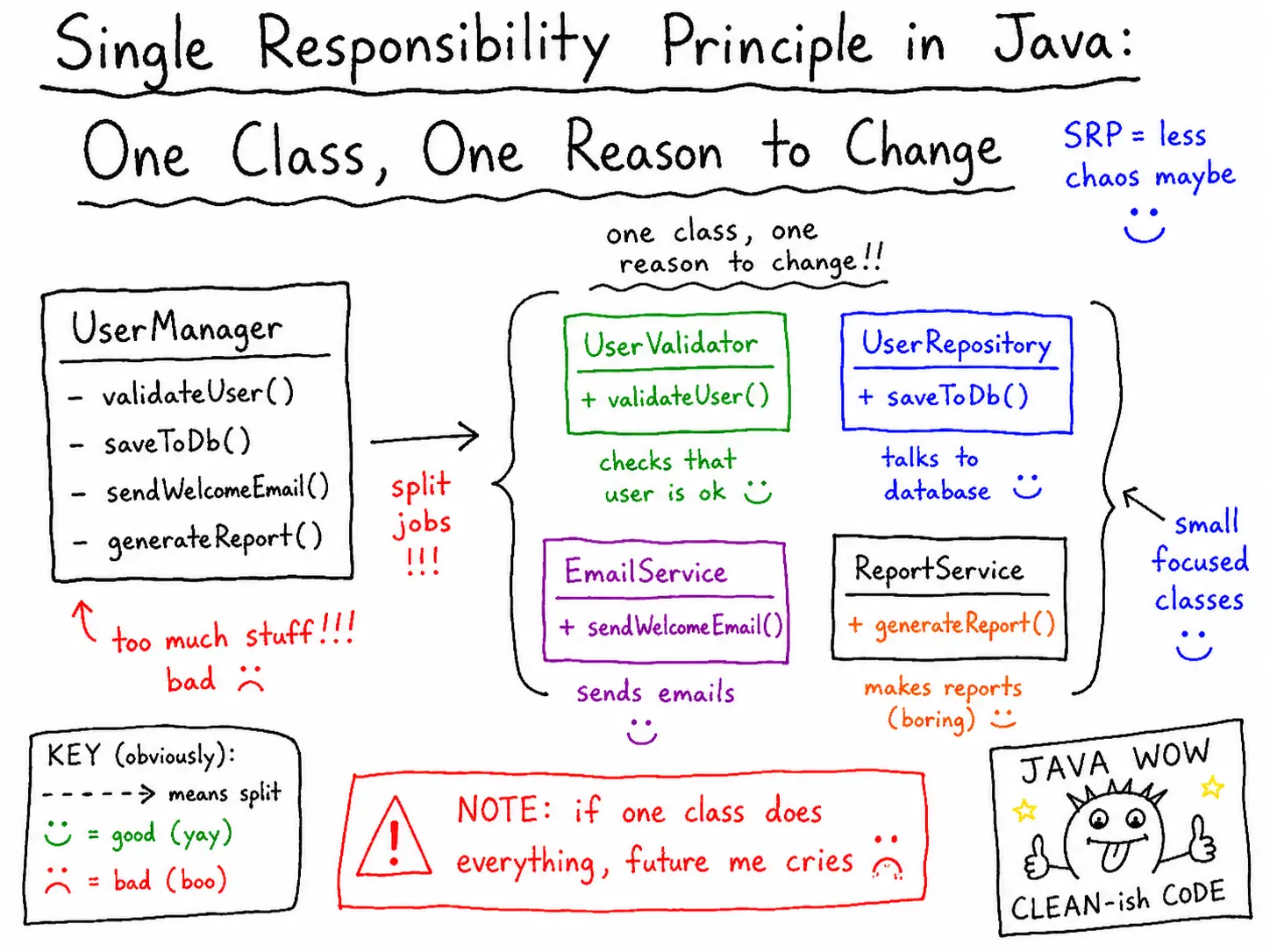
The Single Responsibility Principle, also known as SRP, is the first principle in SOLID.
At first, it sounds very simple:
A class should have only one responsibility.
Another common way to explain it is:
A class should have only one reason to change.
But when I first learned this principle, I found it a little abstract.
What exactly is a “responsibility”?
How small should a class be?
Does it mean every method should have its own class?
Not really.
SRP does not mean we should split everything into tiny classes without reason. It means we should avoid putting different kinds of responsibilities into the same class.
Let’s look at a simple Java example.
A Bad Example: One Class Doing Too Much
Imagine we are building a report feature.
The system needs to:
- generate report data
- save the report to a file
- send the report by email
At first, we might write one service class like this:
public class ReportService {

    public String generateReport() {
        return "Sales Report: total sales = 1000";
    }

    public void saveToFile(String report) {
        System.out.println("Save report to file: " + report);
    }

    public void sendEmail(String report) {
        System.out.println("Send report by email: " + report);
    }
}
And we can use it like this:
public class Main {

    public static void main(String[] args) {
        ReportService reportService = new ReportService();

        String report = reportService.generateReport();
        reportService.saveToFile(report);
        reportService.sendEmail(report);
    }
}
This code works.
However, the design is not good.
The problem is that ReportService has multiple responsibilities.
It is responsible for:
1. Creating report data
2. Saving the report to a file
3. Sending the report by email
That means this class has more than one reason to change.
Why Is This a Problem?
Let’s say the report format changes.
Then we need to modify generateReport().
Later, the file-saving logic changes. Maybe we need to save the report as a PDF or upload it to cloud storage.
Then we need to modify saveToFile().
Later again, the email provider changes.
Then we need to modify sendEmail().
So this one class changes for many different reasons:
Report content changes     → modify ReportService
File-saving logic changes  → modify ReportService
Email-sending logic changes → modify ReportService
This is the main problem SRP tries to solve.
When one class has too many responsibilities, it becomes harder to maintain. A small change in one area can accidentally affect another area.
It also becomes harder to test because one class contains several different concerns.
Applying SRP
A better design is to separate each responsibility into its own class.
First, we create a class for generating the report.
public class ReportGenerator {

    public String generate() {
        return "Sales Report: total sales = 1000";
    }
}
This class has one clear responsibility:
Generate report content.Next, we create a class for saving the report.
public class ReportFileSaver {

    public void save(String report) {
        System.out.println("Save report to file: " + report);
    }
}
This class is responsible only for file saving.
Then we create a class for sending the report by email.
public class ReportEmailSender {

    public void send(String report) {
        System.out.println("Send report by email: " + report);
    }
}
This class is responsible only for email sending.
Now our main code looks like this:
public class Main {

    public static void main(String[] args) {
        ReportGenerator reportGenerator = new ReportGenerator();
        ReportFileSaver reportFileSaver = new ReportFileSaver();
        ReportEmailSender reportEmailSender = new ReportEmailSender();

        String report = reportGenerator.generate();

        reportFileSaver.save(report);
        reportEmailSender.send(report);
    }
}
Now each class has only one reason to change.
Report format changes      → modify ReportGenerator
File-saving logic changes  → modify ReportFileSaver
Email logic changes        → modify ReportEmailSender
This is much cleaner.
A Spring Boot Style Example
In a real Spring Boot application, we usually do not create objects manually with new.
Instead, we let Spring manage the objects for us.
For example:
@Service
public class ReportGenerator {

    public String generate() {
        return "Sales Report: total sales = 1000";
    }
}@Component
public class ReportFileSaver {
public void save(String report) {
System.out.println("Save report to file: " + report);
}
}@Component
public class ReportEmailSender {
public void send(String report) {
System.out.println("Send report by email: " + report);
}
}Then we can create a service that controls the overall flow.
@Service
public class ReportService {

    private final ReportGenerator reportGenerator;
    private final ReportFileSaver reportFileSaver;
    private final ReportEmailSender reportEmailSender;

    public ReportService(
            ReportGenerator reportGenerator,
            ReportFileSaver reportFileSaver,
            ReportEmailSender reportEmailSender
    ) {
        this.reportGenerator = reportGenerator;
        this.reportFileSaver = reportFileSaver;
        this.reportEmailSender = reportEmailSender;
    }

    public void createAndSendReport() {
        String report = reportGenerator.generate();

        reportFileSaver.save(report);
        reportEmailSender.send(report);
    }
}
At first, this may look like ReportService still does many things.
But there is an important difference.
ReportService does not directly implement report generation, file saving, or email sending.
It only coordinates the workflow:
Generate report → Save report → Send reportSo its responsibility is:
Manage the report processing flow.That is acceptable.
The detailed responsibilities are still separated into different classes.
SRP Does Not Mean “One Method Per Class”
One common misunderstanding is thinking that SRP means every class should have only one method.
That is not true.
A class can have multiple methods if those methods belong to the same responsibility.
For example:
public class ReportGenerator {

    public String generateDailyReport() {
        return "Daily report";
    }

    public String generateMonthlyReport() {
        return "Monthly report";
    }

    public String generateYearlyReport() {
        return "Yearly report";
    }
}
This can still follow SRP because all methods are related to report generation.
The question is not:
How many methods does this class have?The better question is:
How many reasons does this class have to change?That is the key point.
How to Recognize SRP Violations
In real projects, SRP violations often appear as large service classes.
For example:
public class OrderService {

    public void createOrder() {
        // validate order
        // calculate price
        // update inventory
        // process payment
        // send email
        // write audit log
    }
}
This kind of class can grow quickly.
At first, it may be fine. But after several months, it can become difficult to change safely.
Some warning signs are:
- the class has too many dependencies
- the class has many unrelated private methods
- the class is difficult to name clearly
- the class changes whenever different business areas change
- testing one behavior requires setting up many unrelated dependencies
When I see these signs, I usually ask:
Is this class doing too much?
That question often leads to a better design.
A More Practical Way to Think About SRP
For me, SRP is not just about making classes smaller.
It is about separating reasons for change.
For example:
Business rule changes
Data access changes
File format changes
External API changes
Notification logic changes
These are different reasons to change.
If they are all mixed in one class, the code becomes fragile.
A better design keeps them separated.
This makes the system easier to understand, easier to test, and easier to modify.
Before and After
Before SRP:
public class ReportService {

    public String generateReport() {
        return "Sales Report: total sales = 1000";
    }

    public void saveToFile(String report) {
        System.out.println("Save report to file: " + report);
    }

    public void sendEmail(String report) {
        System.out.println("Send report by email: " + report);
    }
}
Problem:
One class has multiple responsibilities.After SRP:
public class ReportGenerator {

    public String generate() {
        return "Sales Report: total sales = 1000";
    }
}
public class ReportFileSaver {
public void save(String report) {
System.out.println("Save report to file: " + report);
}
}public class ReportEmailSender {
public void send(String report) {
System.out.println("Send report by email: " + report);
}
}Better design:
Each class has one clear responsibility.Summary
The Single Responsibility Principle says that a class should have one responsibility and one reason to change.
It does not mean every class must be extremely small. It means different responsibilities should not be mixed together.
In the report example, generating a report, saving it to a file, and sending it by email are different responsibilities. Keeping them in one class makes the code harder to maintain.
By separating them into ReportGenerator, ReportFileSaver, and ReportEmailSender, each class becomes easier to understand, test, and modify.
When applying SRP, I usually ask one simple question:
Why would this class need to change?
If there are many unrelated answers, the class probably has too many responsibilities.